
What guidelines should I follow while submitting an FSM support ticket to ensure I can get my issues resolved as soon as possible?
Solving for Entity based issues
FSM (as many softwares) is primarily built around the entities in use. All tickets will eventually come down to solving for an issue with an entity or combination of entities working together to get the business result you want.
What is an entity?
Entities can be users, teams, areas task types, roles, picklists, forms, global attributes, etc. Many of the items in the main menu bar can be thought of as Entities:


Submitting Tickets
Here are some basic guidelines to follow when submitting tickets for FSM
Description and Attachments:
Please provide a brief but clear verbal description of the issue. Reference and attach screenshots and videos as much as possible. A picture is worth a 1,000 words and a video is worth 10,000!
Other Important elements to provide
Do you have a specific task number associated with the issue?
If yes, you absolutely MUST provide the unique task number - the task number will eventually tell us everything about the different entities at play. If we don’t have the task number, we may not be able to help.
This can be found in the Task # column on the main grid. You can simply copy paste it using the copy paste icon
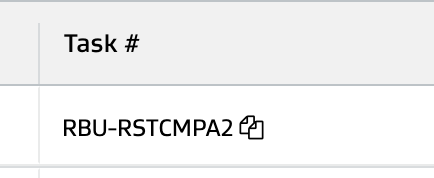
Bonus Points: If you can go into the task details and copy paste the system task ID from the web URL - that would be very helpful and would make supporting task specific issues even faster. See the highlighted part of the URL below - that’s the magic number we’re looking for!
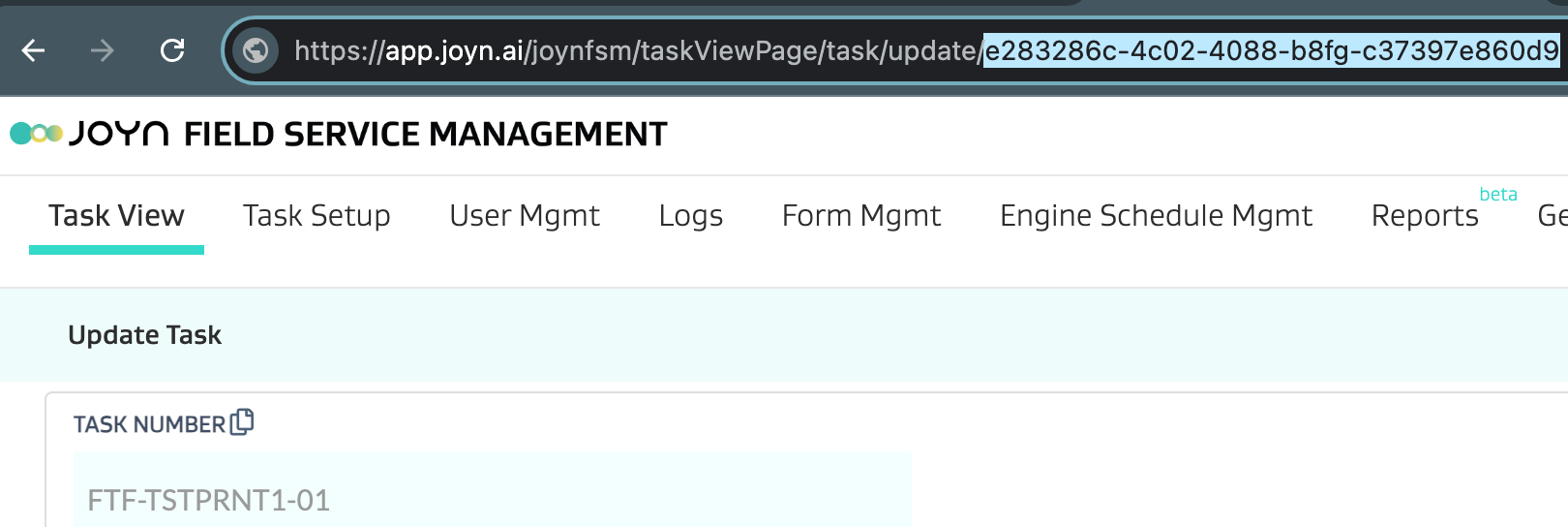
Any specific user having the issue in question or can you provide an example user name that is having the issue?
Providing a username helps us understand how a user is setup and what they may be seeing/facing in the application as they interface with various entities.
Are you having issues with specific entities or combinations of entities?
If yes, please use the following guideline examples to highlight what issues you may be having:
# | Entities | Example | Issue | Attachments |
|---|---|---|---|---|
1 | Task Type and Form | Task Type: Repair Well Task Type Code: RW Form Name: Repair Form | Form doesn’t show up when initiating task type |
|
2 | Picklist and Form | Picklist: Valve Types Form Name: Repair Form | Picklist is not working when setup on the form |
|
3 | User, Team, Area | User: John Doe Team(s): Operations Area(s): Route 55, Route 56 | User John Doe is on the Ops team for Route 55 but is unable to get tasks or select assets while creating tasks. |
|
Is the problem in the web admin screen or the mobile application?
Note what interface, platform and device the issue is on:
Interface | Platform | Device |
|---|---|---|
Web | Chrome Browser | Surface Tablet |
Web | Safari Browser | Macbook |
Mobile | iOS | iPhone 15 |
Mobile | Android | Google Pixel 7 |
Are you facing any errors while using APIs?
Provide the API payload with any error results in your ticket submission so that we can better troubleshoot and replicate exactly what you may be trying to perform with the API.