
What is Delta-Sync/Slide-Sync of a route on OneApp? When should the user Slide-sync a route?
Delta-Sync/Slide-Sync is an action of “syncing a route” manually by sliding and syncing for a route on the routes tab.
As part of the Delta-Sync(Syncing a Route) the following actions are performed by the application
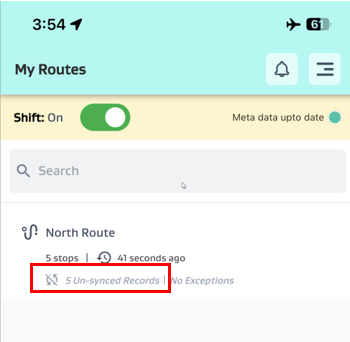
Any data which has been modified in the app, and not yet saved to server are synced to the server. - Sync data from OneApp to Server
Any transaction (reading), belonging to the route, which have been modified outside the app and are not yet brought to the app are fetched and saved on the OneApp. – Restore Data from Server to OneApp
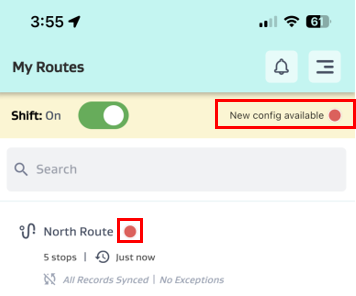
Any metadata updates, which have been notified ( Red-Dot showing on the Route) will be updated. Only addition/modifications to existing metadata is updated – Restore changes made to Metadata/MasterData
Deletion/Removal/De-activation does not update as part of Slide-Sync. Clear Data must be done for these types of metadata changes.
When does the user need to Manual Sync??
Manual sync (delta-sync/slide-sync) of a route is needed in the following scenarios
Anytime the Routes are showing, unsynced records > 0 and the user wishes to sync data to server immediately.
Manual Sync of a route is needed atleast once, to ensure the route specific metadata/transactions are fetched firsts time and OneApp starts receiving updates of the metadata/transactions for this route.
Before “clicking clear data”, ensure the routes used are slide-synced one last time to ensure all the pumper updated data are synced back to the server.
If Metadata update notifications “ Red Dot”, is showing up on any of the route, ensure you do “slide-sync” of the route to fetch the latest metadata/masterdata relevant for usage of the route.
.png?inst-v=c42436b3-8f45-466c-8696-2d2dccda6150)
If “New Metadata is available” notification shows up while using the application, you may finish the ongoing data-entry and navigate to the route screen as soon as possible to Slide-Sync all the routes with “Red Dot” and update them.
.png?inst-v=c42436b3-8f45-466c-8696-2d2dccda6150)