
What kind of Reporting does JOYN FSM have out of the box?
JOYN FSM Reporting Types
There 2 types of reporting provided in JOYN FSM:
The primary is Operational Reporting - this is less a report and more a natural part of the application that help the user monitor tasks, view progress and ensure work is moving along and getting executed. The default Grid View in the application serves as the user’s main place to get quick information. Long story short - in this mode of reporting - the report is the application and the application is the report. More on this later…
The second is Traditional Reporting - these are standard out of the box reports/dashboards to provide users with insights about the tasks they are working on or about how they are using the application. We started adding these reports in 2023 based on customer input that was common across the board which made it easy to build standardized reports/dashboards. The JOYN product team at W Energy is constantly working on adding new reports/dashboards based on aggregated inputs from customer interviews/feedback.
Operational Reporting
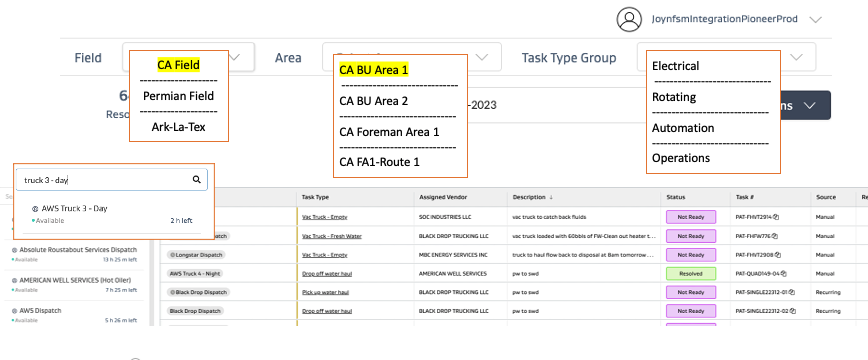
JOYN FSM allows you to filter at each level by letting you select the level at which you want to view tasks or by limiting access to levels to which the user should not have access to. This will allow you to filter the Main grid by Field, Areas, Sub-areas or Routes and even functional task type groups as needed.
Setting these filters will also filter out the resources on the left panel to only those resources that are part of the selected Field/Area/Functional Task Type Groups.
The web user can also save certain filters to get back to predefined search results quickly such as wanting to view only high priority tasks, or tasks assigned to a certain user, or tasks that have not yet been accepted, etc
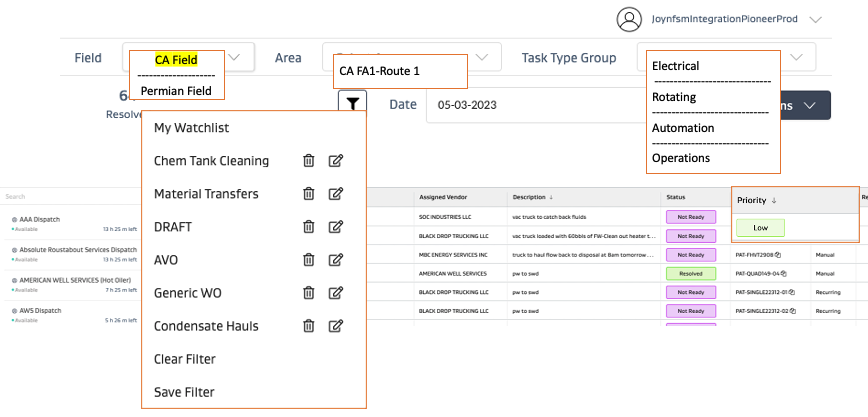
NOTE that the main screen is the application but it also serves as the report - hence the application is the report and the report is the application!
The setup can be as follows:
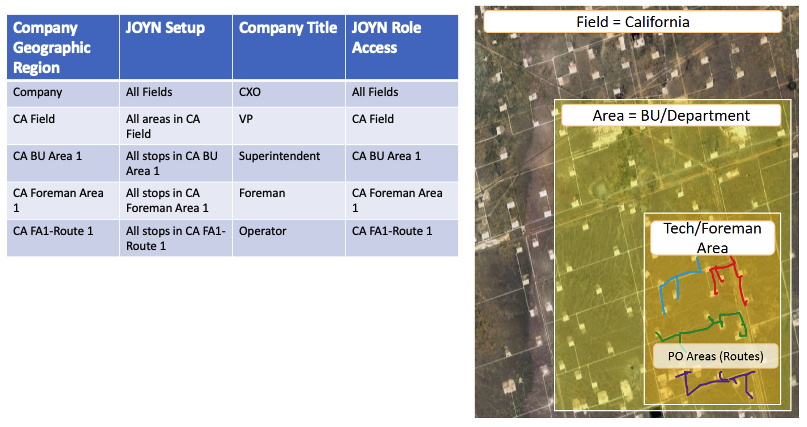
Role access can be setup as follows:
Traditional Reporting
Primary Goal/Intended use case of tool: Post work execution analysis/analytics
For more traditional reporting, JOYN does have some out of the box reports where the user can filter for Fields, areas, task types, stops, locations, users, date ranges, etc and get a very basic dashboard.
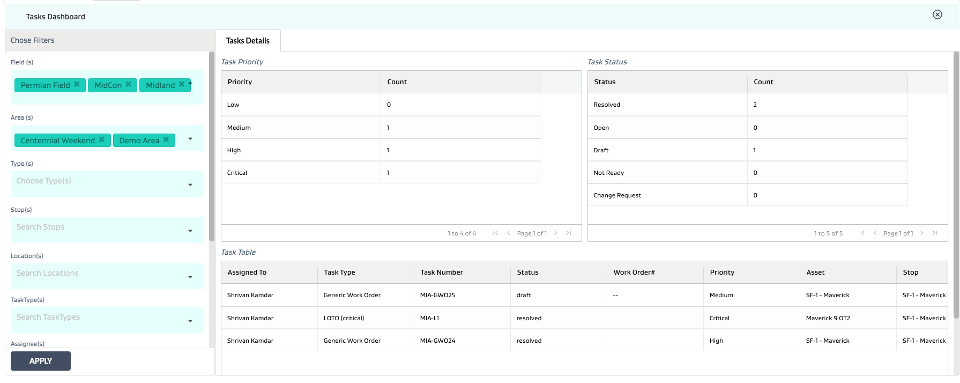
Export Manager
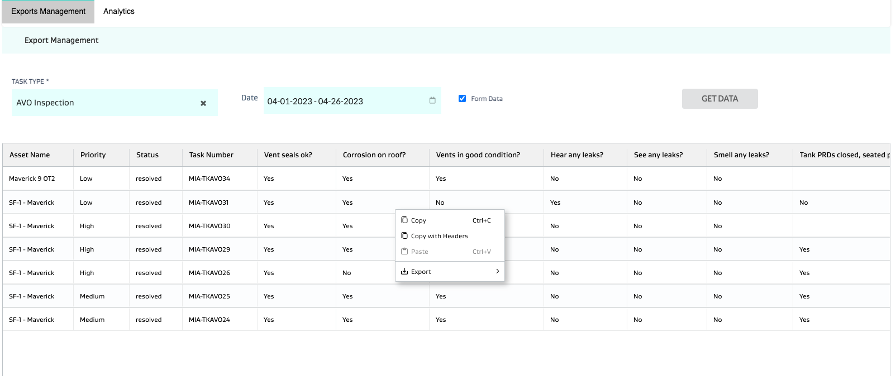
Export Manager: The export manager allows you to select a task type and a date range and get a data dump of all tasks related to that task type in the selected date range. This can then be exported to excel by right clicking anywhere on the grid.
Other Types of Data Availability
Other Forms of Data Availability: Pretty much any grid in JOYN FSM can be exported as an excel. Simply right click on any white space in the grid and do so.
3rd party BI tools
Any additional reporting that requires custom analysis of very specific initiatives or use cases can always be done on dedicated BI tools such as PowerBI, Spotfire, Tableau, etc by utilizing JOYN FSM’s APIs to extract data out and perform any additional analysis.
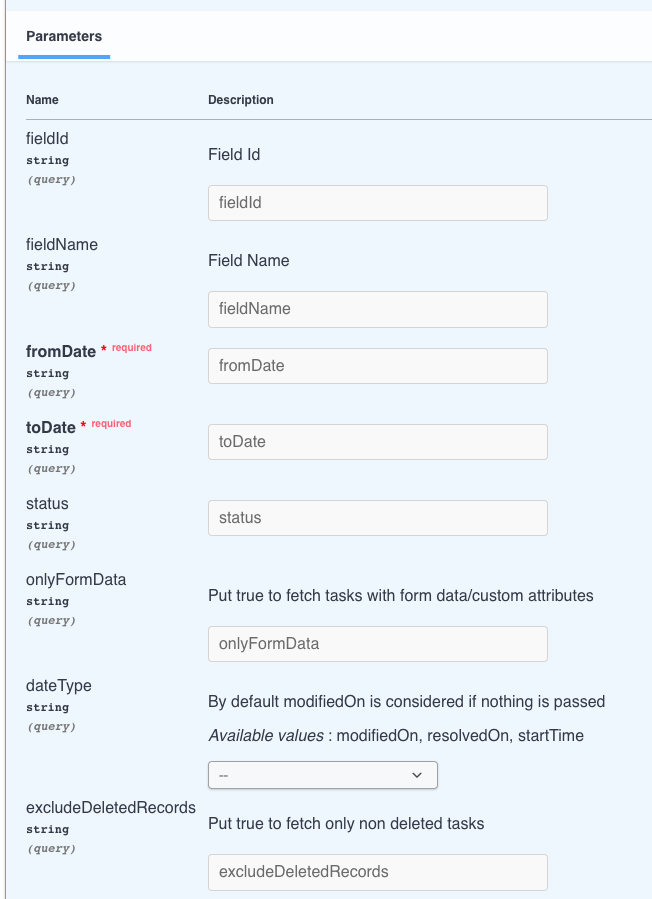
Below is the JOYN FSM Get Task API with parameters and sample response:

{
  "message": "string",
  "success": true,
  "tasks": [
    {
      "id": "string",
      "xid": "string",
      "tenantId": "string",
      "assetId": "string",
      "fieldId": "string",
      "taskTypeId": "string",
      "isRecurring": true,
      "isDeleted": true,
      "duration": 0,
      "assigneeIds": [
        {
          "assigneeId": "string",
          "sequenceNo": 0,
          "isDeleted": true,
          "vendorId": "string"
        }
      ],
      "data": {},
      "eventSource": "string",
      "status": "string",
      "priority": "string",
      "score": 0,
      "increment": 0,
      "startTime": "2020-09-15T07:38:11.372Z",
      "endTime": "2020-09-15T07:38:11.372Z",
      "attachments": [
        {
          "bucket": "string",
          "key": "string",
          "fileName": "string",
          "region": "string"
        }
      ],
      "createdOn": "2020-09-15T07:38:11.372Z",
      "modifiedOn": "2020-09-15T07:38:11.372Z",
      "createdBy": "string",
      "modifiedBy": "string",
      "comments": [
        {
          "id": "string",
          "comment": "string",
          "fieldId": "string",
          "taskId": "string",
          "modifiedOn": "2020-09-15T07:38:11.372Z",
          "createdOn": "2020-09-15T07:38:11.372Z",
          "createdBy": "string",
          "modifiedBy": "string",
          "attachments": [
            {
              "bucket": "string",
              "key": "string",
              "fileName": "string",
              "region": "string"
            }
          ],
          "assets": {},
          "users": {}
        }
      ]
    }
  ],
  "total": 0
}