
What is the standard way to utilize JOYN's APIs to integrate with 3rd party systems for updating master data or transaction data in other systems?
JOYN APIs can be used to transfer data in and out of JOYN.
Similarly, a 3rd party software API would also be similar - it would be built to transfer data in and out of said 3rd party system.
The typical setup would be as follows:
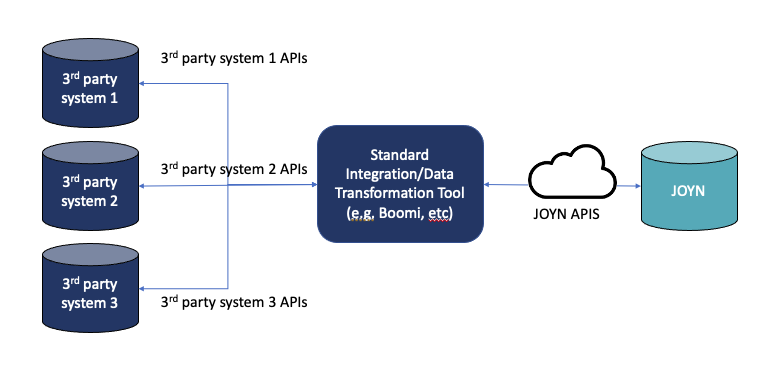
Examples of Standard Integration/Data Transformation Tools (according to Gartner) include:
Boomi
Zapier
IBM App Connect
Mulesoft Anypoint Platform
Magic xpi Integration Platform
Informatica Inteliigent Data Manager
BizTalk
IFTTT
NOTE: You may be wondering why JOYN cannot call 3rd party APIs directly. The following is a list of risks as to why JOYN would not be setup to call a 3rd party API for critical updates such as Master Data.
NOTE2: We also understand that it may make sense for JOYN to communicate with other systems directly to kick off certain workflows and processes (especially on the FSM module). Such situations are taken into considerations and product updates are made to be able to enable the implementation of these use cases with ease and flexibility.
Update | From | To | Directly/Indirectly | Via | Risk | Description | Exceptions |
|---|---|---|---|---|---|---|---|
Master Data | JOYN | 3rd party system | Directly | 3rd party source system API | Security/Business Disruption | Erroneous updates of master data 3rd party system may not understand JOYN payload directly | None - Best Practice is to use a Data Integraton Tool to deliver payload from JOYN via JOYN API and then 3rd party system’s API or other pre-existing mechanism from Integration Tool to 3rd party source system. |
Transactions | JOYN | 3rd party system | Directly | 3rd party source system API | Security/Business Disruption | Erroneous updates of critical transactions 3rd party system may not understand JOYN payload directly | Best Practice is to use a staging table to deliver payload from JOYN to Integration Tool via JOYN API and then 3rd party system’s API or other pre-existing mechanism from Integration Tool to 3rd party source system. Limited - triggering certain updates or record creations using predefined and limited APIs |
Master Data | 3rd party system | JOYN | Directly | 3rd party source system API | Security/Business Disruption | Erroneous updates of master data JOYN may not understand 3rd party payload directly | None - Best Practice is to use a Data Integraton Tool to deliver payload from JOYN via JOYN API and then 3rd party system’s API or other pre-existing mechanism from Integration Tool to 3rd party source system. |
Transactions | 3rd party system | JOYN | Directly | 3rd party source system API | Security/Business Disruption | Erroneous updates of critical transactions JOYN may not understand 3rd party payload directly | Best Practice is to use a staging table to deliver payload from JOYN to Integration Tool via JOYN API and then 3rd party system’s API or other pre-existing mechanism from Integration Tool to 3rd party source system. Limited - triggering certain updates or record creations using predefined and limited APIs |