
Upstream Revenue - Adding An Asset Config
The Asset Config screen connects wells to meter numbers (1:1) or groups to meter numbers (many:1). This connection determines how meters uploaded with volumes and values from the purchaser will be allocated to the associated well(s). Once meters, well completion selections, and/or groups have been added, these can be connected using the steps below. There is currently not an uploader option for these setups.
📘 Instructions
Add an Asset Config Record
Make sure the asset at the top of the WEnergy screen is correct
Navigate to Asset Setup>Asset Config
Make sure the effective date range is correct for the meter/well/groups parings that need to be added
Must have a start date on or after the start date of the meter/well/group effective dates for the records to appear in pick lists on this screen later.
A range that already exists can be selected by click the down arrow next to the date.
-Or- To add a new date range, click the Plus button.
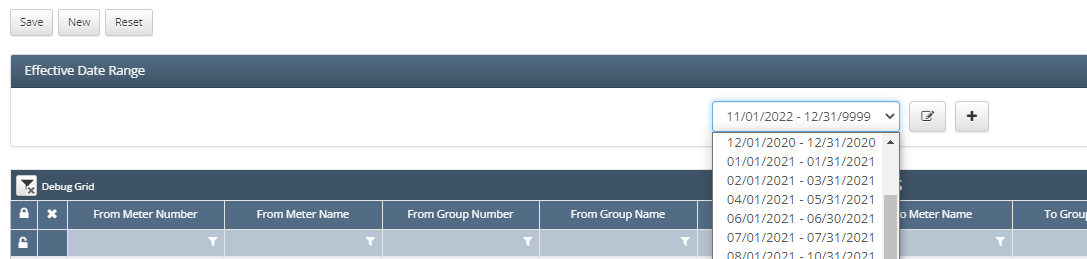
To add a new date range, click the Plus button.
Once the date range is correct, click the New Button.
A blank row will be added to the bottom of the grid.
If adding a well to meter relationship:
Click the blank cell under From Meter Number
A pick list will appear pulling from the Physical Setup>Well Completion Selections screen
Select the Well from the list
On the same line, under To Meter Number click in the blank cell
A pick list will appear pulling from the Physical Setup>Meters screen
Select the Meter from the purchaser statement
If adding a Group to Meter relationship:
Under To Meter Number click in the blank cell
A pick list will appear pulling from the Physical Setup>Meters screen
Select the Meter from the purchaser statement
On the same line under From Group Number, click in the blank cell
A pick list will appear pulling from the Physical Setup>Groups table
Select the group to pair with the Meter
Click Save at the top of the screen
Continue for every relationship that needs to be built
Once these are all saved, a visible representation of how data will be allocated to wells is under Asset Setup>Asset Builder.