
Upstream Revenue - Create an Owner Suspense Record
To put an owner’s line of interest and/or amounts in suspense, a suspense record can be created and posted. Workflows can be used with a suspense records or these can be configured to be auto posted on submission. Division Orders “DOs” will be updated based on the data entered below if DO Lines of Interest are selected to transfer.
📘 Create Owner Suspense Instructions
Navigate to Division Order>Owner Suspense
Click Create New Suspense button at the top of the screen

A new record will appear
Select the Suspense Level from the dropdown list
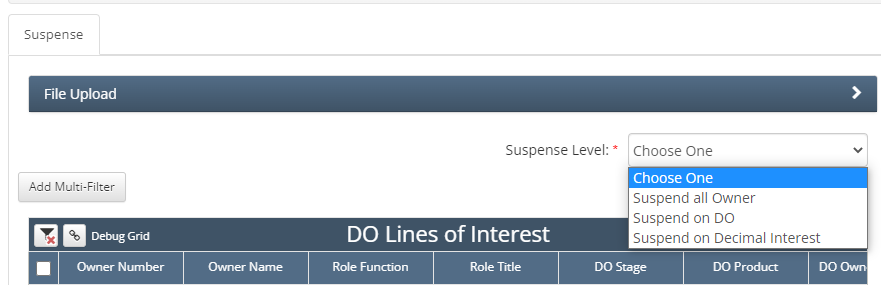
In the DO Lines of Interest, search for the owner number(s), division order, ect. (any criteria from the headers)
If division orders are locked by the Company Process Control -or-
The owner line is already in an unposted record, the lines will not be available to select
Once the detail is filtered down, click the mass select button or click the boxes line by line
Once blue check marks are made on the records to suspend, click the Add to Queue

This will move the owner lines of interest to the Suspense Queue box
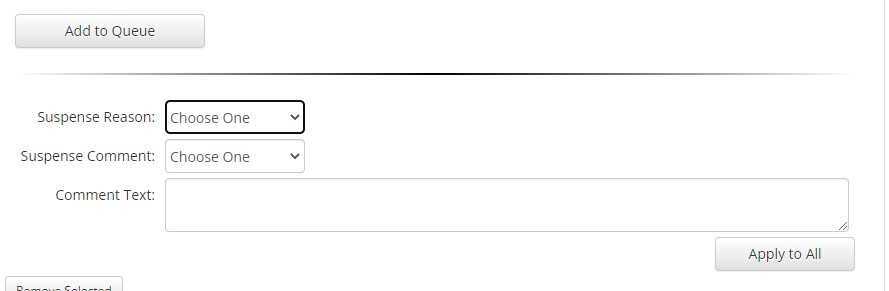
Select a suspense reason
Select a suspense comment
Comment in the Comment Text is optional
Click Apply to All to add the desired suspense reason and comment to the LOI
If owner amounts also need a suspense code added or updated, search for the owner amounts using the desired criteria based on the headers on the grid
If the select box is greyed out:
Division Orders are locked by the Company Process Control -or-
The owner amount lines are locked by another un-posted record.
Scrolling to the right on the Owner Amount Suspense Queue will give you a record under Lock Reason.
Mass select the owner records
Click Add to Queue
The amounts will move to the Owner Amount Suspense Queue
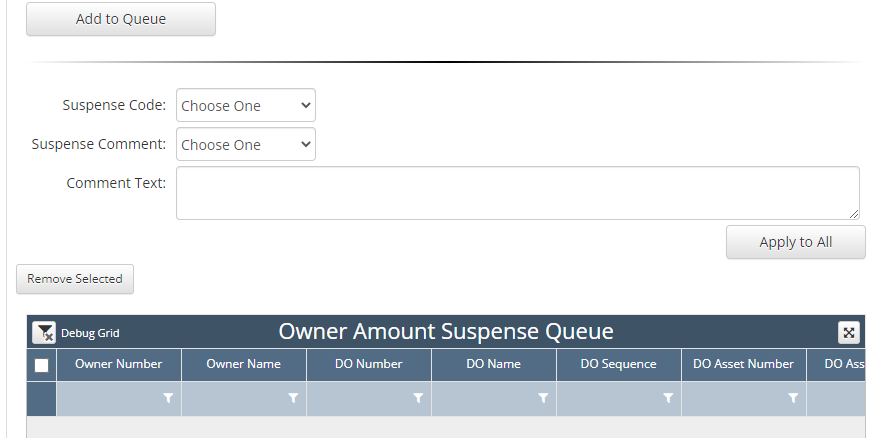
Select a Suspense Code
Select a Suspense Comment
Comment in the Comment Text is optional
Click Apply to All to add the suspense comment and reason to the owner amount