
Upstream Revenue - How to Void Revenue Payments
The steps below will outline how to void paid amounts in the Upstream Revenue module. Before continuing with these steps, make sure the AP Voucher(s) in the Financials modules is voided. If the AP Voucher created from a prior Company Process Control is not voided, the system will double pay the amounts through the Company Process Control since the Financials and Upstream Revenue Modules are not integrated for voiding payments.
📘 Void Revenue Payment Instructions
Navigate to Disbursements>Void Payments
If the amounts need to be voided to the suspense account:
Select a Suspense Code
To add a new Suspense Code go to Global Setup>Code Tables>Upstream Suspense Codes
Select a Void Reason
To add a new Void Reason, go to Global Setup>Code Tables>Void Reasons
Search for the Owner Number, and identify the records that match the AP Voucher that was voided
Select the record(s) to be voided by clicking the box on the far left of the grid
Click Void Selected Payments
In order for the journal entries associated with this void to be booked, a Company Process Control needs to be run.
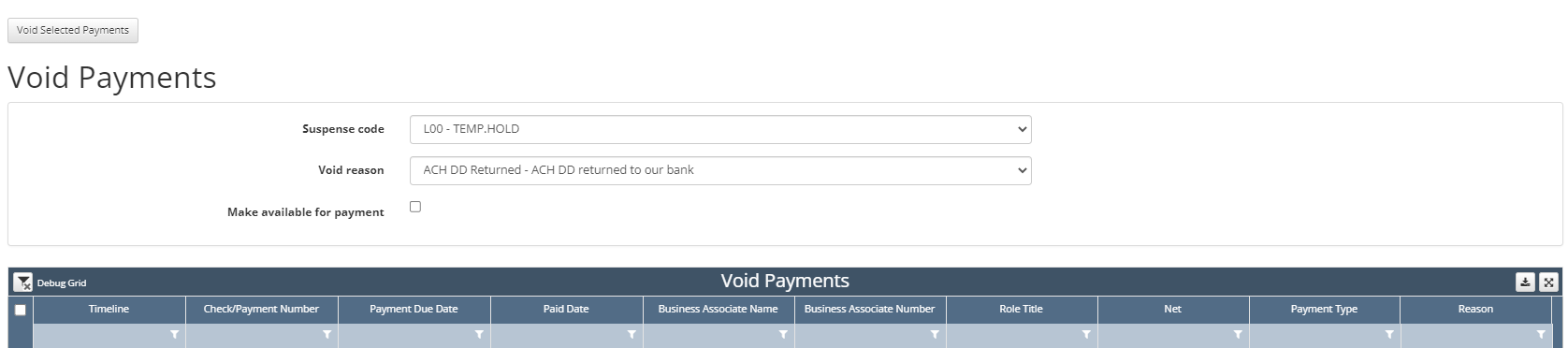
If the amounts need to be voided to pay on the next Company Process Control
Click Make available for payment
Select the record(s) to be voided by clicking the box on the far left of the grid
Click Void Selected Payments
In order for the journal entries associated with this void to be booked, a Company Process Control needs to be run.
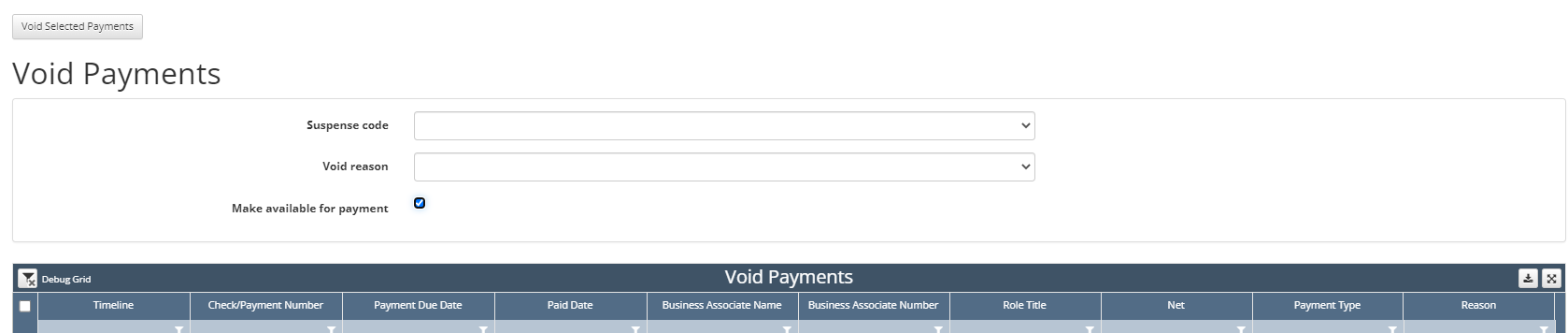
Records will pull in with a status of Void on the next Company Process Control

Voided amounts cannot be transferred, released, suspended, or paid until the Company Process Control is run.