
What is an area?
Areas (not necessarily the same as in FDG) are a collection of stops for a given purpose. A worker can work in multiple areas.
Areas can be set up in a nested structure, but they are not necessarily hierarchical. For example:
a foreman’s area which includes multiple routes
A single operator’s route
an area for an inspection team that can be the same as the foreman area
an electrician’s support area that supports 2.5 operator routes
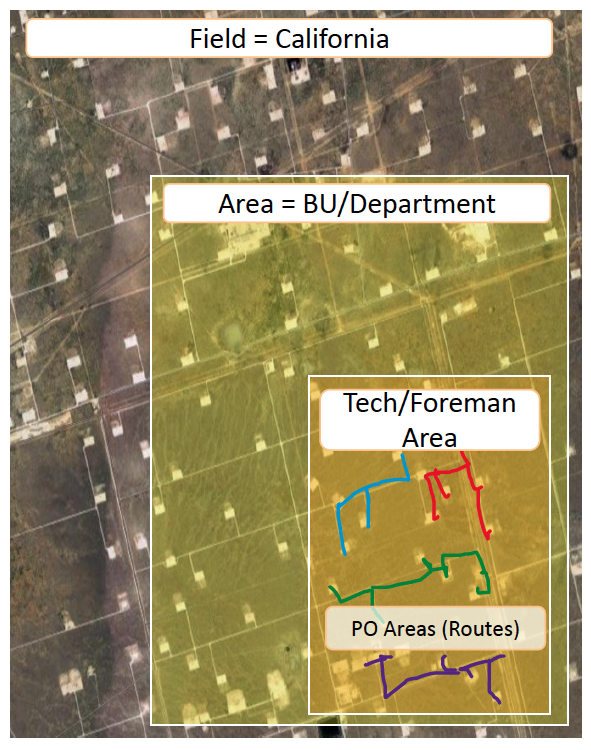
When deciding/selecting these hierarchies for setup - it can often get confusing based on the reality of organizational hierarchy in the field and data hierarchies in your existing systems. Here’s a sample table that can help clarify those discussions and ensure proper mapping to FSM.
FSM Hierarchy | Description | Equivalent data hierarchy in your relevant source system(s) | Organizational Hierarchy for Customer |
Field | Geographically isolated region; for eg Permian Basin or Marcellus | (for Customer to fill out) | (for customer to fill out) e.g. Rockies Supervisor/Superintendent |
Area | An area that belongs to an individual; note these can be nested areas – for e.g.
| (for Customer to fill out) | (for customer to fill out) e.g. Foreman e.g. Lease Operator (if Route) e.g. Electrical Department Lead/Foreman e.g. Maintenance Department Lead/Foreman
|
Stop | A geographic location in the field with a lat/long that usually consists of different assets such as wells meters, tanks, and other misc equipment (compressors, pumps, etc) | (for Customer to fill out) | (for customer to fill out) e.g. Lease Operator e.g. Electrical technician or Maint technician |
Asset | Individual assets in a stop – well, meter, tank, misc equipment (compressor, pump, separator, etc) | (for Customer to fill out) | (for customer to fill out) e.g. Lease Operator e.g. Electrical technician or Maint technician |
Mapping Templates
The following templates can be used for Area Mappings:
If you want to dynamically align areas with Routes:
In this setup - if the route changes in FDG, the area automatically updates in FSM
For larger level areas - where the areas are managed by Foreman or Hard Trades (Electrical/Maintenance Departments)
Field | Area | Routes |
|---|---|---|
Midland | NW Midland | NW Midland Route 1 |
Midland | NW Midland | NW Midland Route 2 |
Midland | NW Midland | NW Midland Route 3 |
Midland | NE Midland | NE Midland Route 1 |
Midland | NE Midland | NE Midland Route 2 |
etc… |
Template For Route level Areas - where the areas are managed by Lease Operators
Field | Area | Routes |
|---|---|---|
Midland | NW Midland Route 1 | NW Midland Route 1 |
Midland | NW Midland Route 2 | NW Midland Route 2 |
Midland | NW Midland Route 3 | NW Midland Route 3 |
Midland | NE Midland Route 1 | NE Midland Route 1 |
Midland | NE Midland Route 2 | NE Midland Route 2 |
etc… |
If you want to create static areas built using individual stop locations
For larger level areas - where the areas are managed by Foreman or Hard Trades (Electrical/Maintenance Departments)
Field | Area | Stop |
|---|---|---|
Midland | NW Midland | Hedgehog HZ Battery |
Midland | NW Midland | Chickenleg 25H |
Midland | NW Midland | DropTop 83 Chevy SWD |
Midland | NE Midland | Bigtimer 92 HZ |
Midland | NE Midland | Lady Luck 45 Battery |
etc… |