
What do all the different dependency options mean while creating a Parent-Child Template?
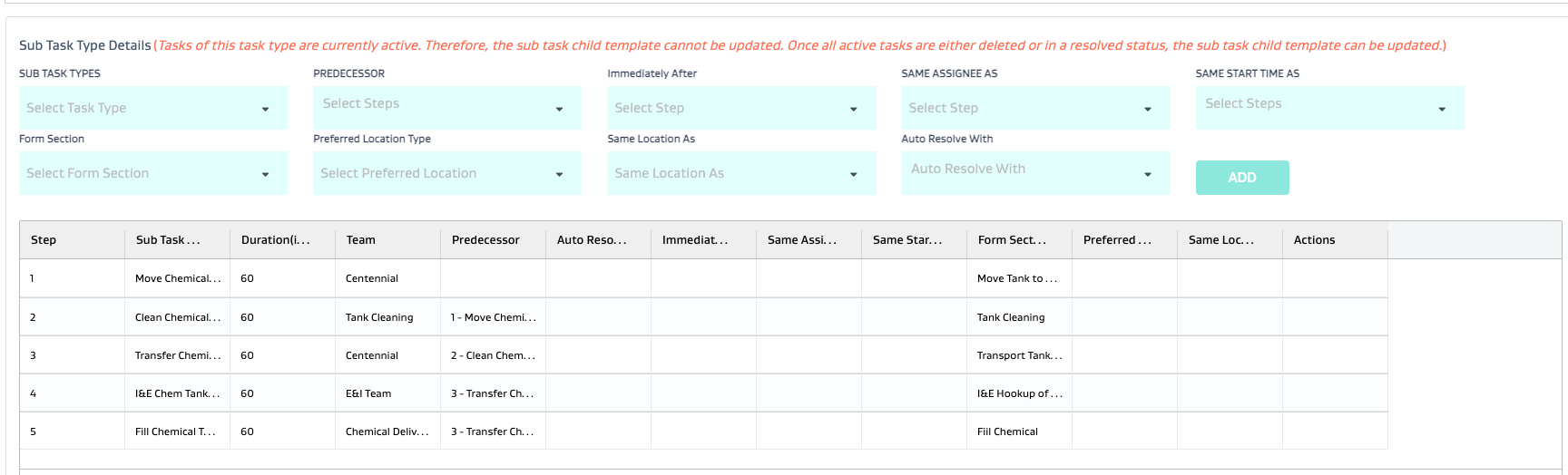
# | Option | Description | e.g. |
|---|---|---|---|
1 | Predecessor | Selects the predecessor task that would need to be resolved before the subject task can be worked on | LOTO followed by |
2 | Auto Resolve With | Selects the task with which the subject task would automatically resolve | Tasks that require no data entry/action but still need to be tracked and resolved separately |
3 | Immediately After To | Selects the task after which the subject task must be done without any other tasks being done in between | Water haul pick up followed by Water Haul drop off |
4 | Same Assignee As | Selects the same assignee for the subject task as the referenced task | Need the same assignee to perform the drop off that did the pick up |
5 | Same Start Time As | Selects the same start time for the subject task as the reference task | 2 tasks occurring in parallel that need to start at the same time |
6 | Form Section | Selects the section of a form that will be filled out by the assignee of the subject task | Shared form with dedicated sections for each separate task assignee in the workflow; For e.g. E-manifest has waste generator, transporter and disposal facility sections on the same form filled out by the separate parties. |
7 | Preferred Location Type | Selects the preferred location based on the primary asset metadata for the subject task | Closest SWD disposal for a water haul drop off task; where the primary asset location is the pick up point |
8 | Same Location As | Selects the same location for the subject task as the reference task | Work is done at the battery, but multiple personnel have parts pick up tasks at the same warehouse location |
Related Articles
- How many different ways can I use file attachments on a task? When should I use each one?
- How do I setup a form?
- What do all the different dependency options mean while creating a Parent-Child Template?
- How do I create Dynamic or Ad Hoc Parent Child Tasks?
- What is the difference between a task type attribute, a global attribute and a form attribute?