
Why isn't a meter showing up as a volume source?
In order to understand why a meter doesn’t show up as a volume source, you need to understand how Disposition volume sources are identified.
Allocation config
Volume source readings in the Allocation config help define Objects types and Sub-object types which are sources of volume readings.
In cases where you have defined subtypes for the volume sources, the allocation module scans through the objects in the network and only selects those objects where the object subtype ( Defined in the asset attributes) also matches the setting given in the allocation config.
Both object subtype and object type match the settings defined in the allocation config.
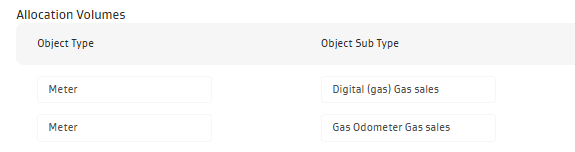
The set up above results in only two (Digital (gas) Gas sales, Gas Odometer Gas sales) meter subtypes considered as volume sources for the sales disposition. Any other meter with a different subtype would not be considered to be a volume source for gas sales.In cases where the object subtype is not defined, the system will consider objects (matched) of all subtypes to be valid volume sources.
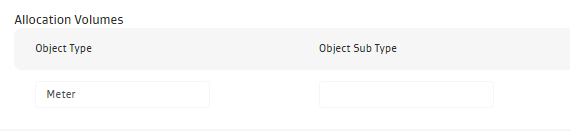
Enable Formula meters as volume sources
Formula meters are not physical objects or assets available to configure on the components/assets screen, so you do not need to explicitly configure the formula meter volume source in the allocation config.
If you want to use formula meters as volume sources, make sure that the volume sources config does not filter out objects by subtypes. At least one meter entry should exists where the objects subtype field is left empty. The volume used for allocation on a formula meter is obtained from the output of the formula.
Debug steps (if an object does not show up as volume source)
Check if the object/object subtype is a volume source in the Allocation config for the disposition of interest.
If not, you can either change the object subtype to match the volume source subtype in allocation config or modify the allocation config.
To modify the allocation config, you can remove the object subtype filter for the volume source or add a new volume source record, which would have the appropriate object subtype as volume source.
Related Articles
- What is the difference between Daily Ledger- Tanks, Daily Ledger Wells and Monthly Ledger - Tanks
- What dispositions in Joyn Allocations are locked-in ( not changeable)?
- How do I update formula meters in a pre-existing allocation network with a new calculation logic?
- Why isn't a meter showing up as a volume source?
- How do trigger allocations work?
- Can I run allocations by Purchaser or Production team?
- How do I configure a network to use downtime and flowing events for allocations?
- How do I setup event-based downtime allocations?
- Does re-running allocation create duplicates or over-write existing allocation results?
- Can production accountants perform reconciliation at a different temperature/pressure base?
- What do the "Allocation Source doesn’t equal the sum of the Allocated Well Volumes" exceptions indicate?
- How do I set up net volume allocations?
- How to setup allocations, if readings start date is not the start of the month?
- What is the SOP for initializing ledgers?