
What is a team?
A team is a group of individuals that can perform a set of task types.
NOTE: 1 team can be mapped to multiple task types but 1 task type can only be mapped to 1 team.
Therefore, teams are usually created as groups of people who have a common skillset.
For e.g.
electricians
lease operators
compressor specialists
instrumentation specialists
etc
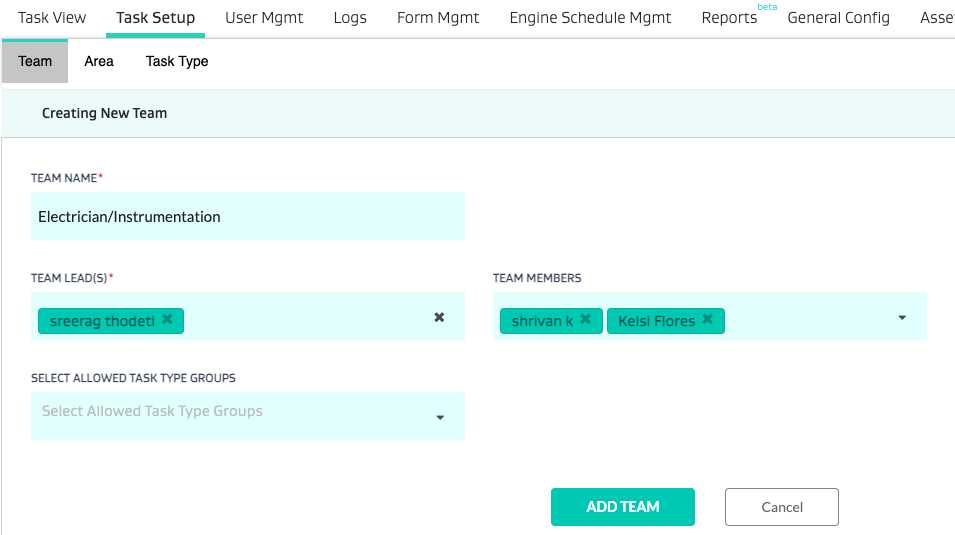
You can add a team under Task Setup>Team
Name the team
Add the lead
Add the team members
NOTE: The team members can then be mapped to the appropriate Area that they are working in.
- How do I move stops in and out of dynamic areas which are setup based on routes in FDG?
- Key Analytics Definitions
- How do I setup a user?
- How do I change the task type AFTER creating the task?
- How do I create and manage roles?
- What is the difference between a task type attribute, a global attribute and a form attribute?
- What is an area?
- What is a field?
- How do I set up FSM?
- How do I set up a task type?
- How do I push open tasks to the next day?
- How do I attach metadata attributes to equipment or wells?
- What is a stop?
- How do I attach a stop to an area?